
Business intelligence and reporting for IBM i
MBI — Modern Business Intelligence — helps organisations work with operational data held in IBM i environments through dashboards, grids and reusable reports, without replacing the systems that already run the business.
IBM i is the current name for the platform many organisations still know from its AS/400, AS400, iSeries or System i lineage. MBI is built for reporting and business intelligence over that operational data.

The reporting challenge
IBM i runs the business. Reporting still has to keep up.
IBM i remains a dependable platform for operational systems. The challenge is often how easily finance, operations and management can explore and report on the information already held there. Teams that still rely on tools such as Query/400, exported data or established reporting processes can find it harder to present that information in a clear, shareable way. MBI provides another way to make operational information easier to explore and report on while organisations keep the systems that already run the business.
Reporting that still depends on tools such as Query/400 or established green-screen workflows
Answers that often require exported data before they are usable
Business users waiting on technical staff for routine reports
Difficulty presenting operational information as clear dashboards
Limited ability to move from summary views into line-level detail
Keep what works
Improve reporting without replacing IBM i
MBI is intended as a modern reporting and business-intelligence layer over operational data — not a replacement for IBM i, your ERP, or the applications that already run day-to-day work. Where environments such as BPCS or Infor LX sit on supported platforms, teams can keep those systems and still improve how people work with the information they hold.
IBM i stays in place
Focus on clearer dashboards and reports over existing operational data, rather than a platform migration project.
ERP context preserved
Work with business data already held in IBM i environments, including established ERP landscapes where they are supported.
Reporting layer, not rip-and-replace
Give business users a clearer way to explore approved information while administrators retain control of the reporting foundation.
What MBI provides
Practical BI capabilities over operational data
MBI — Modern Business Intelligence — is PandaLogica’s flagship product. It is a Windows desktop application designed for dashboards, operational grids and governed reporting over data held in IBM i and SQL Server environments.
Present IBM i operational data in dashboards and operational grids
Keep the core IBM i / ERP environment in place
Give business users governed self-service reporting where the data model allows
Save reusable layouts and follow related reports from selected values
Offer another path to everyday reporting without replacing core systems
Dashboards
Present performance, trends and exceptions in clear management and operational views.
Operational grids
Filter, group, sort and summarise line-level detail for day-to-day investigation.
Reusable reports
Use the same report as both a dashboard overview and a detailed grid where the model allows.
Saved layouts
Save filters, groupings, summaries and preferred views for repeated use.
Related reports
Move from selected grid values into related reports with the right filter already applied.
Admin data model & RBAC
Administrators define tables, fields, joins and access rules; users work within approved reports and roles.
In the product
From overview to line-level detail
Teams can move between dashboard views and operational grids without rebuilding the same report twice. That matters when IBM i environments hold the detail operations and finance need, but managers also need a clearer summary picture.
Screenshots show genuine MBI product behaviour. They are not IBM i green-screen captures or fabricated customer interfaces.
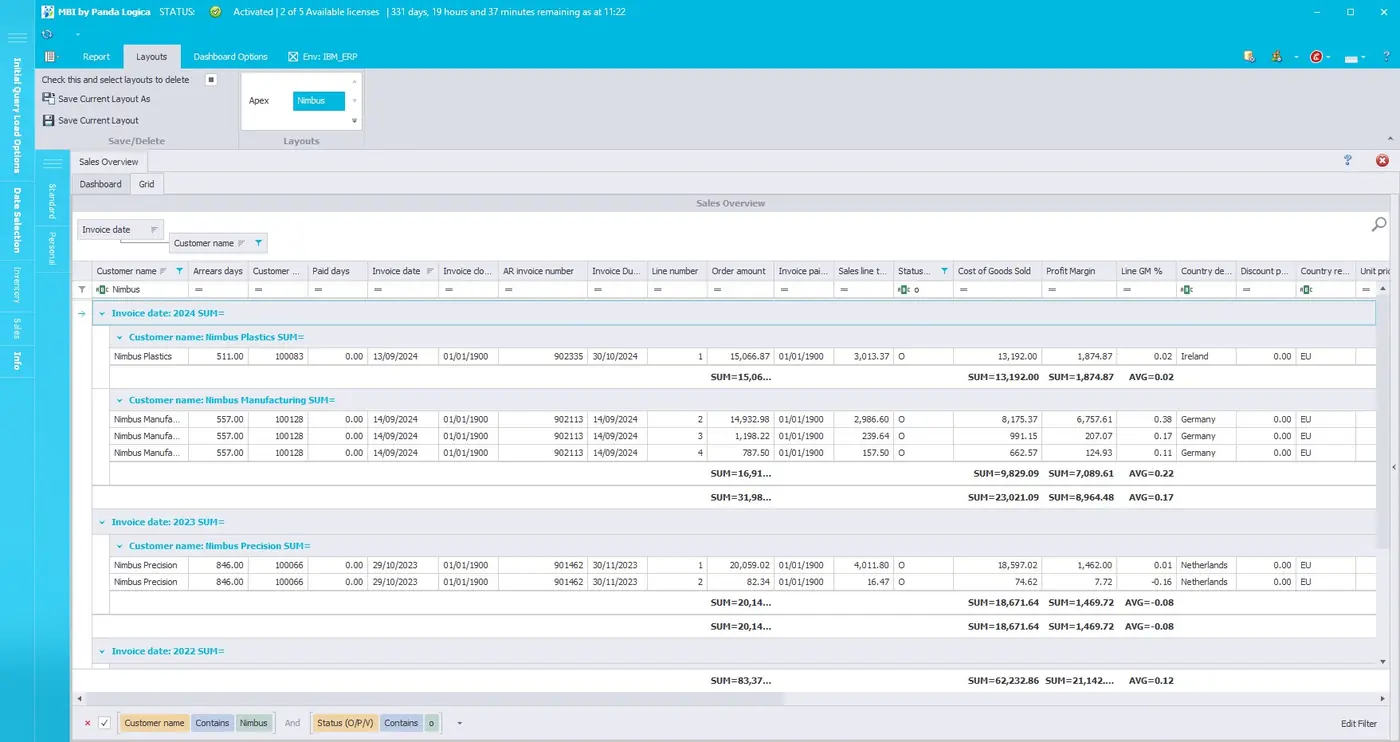
How organisations use MBI with IBM i
A reporting layer alongside the systems you already run
At a practical level, MBI sits alongside IBM i as the place teams go for dashboards and reusable reports over business data already held in those environments. Administrators set up the reporting foundation; business users then work with approved views rather than relying on ad-hoc exports for every question.
1. Define the reporting foundation
Administrators configure source structure — tables, fields, joins, calculated values and access rules — so reporting stays consistent and governed.
2. Publish dashboards and grids
Teams receive reusable reports they can open as dashboards for overview or grids for line-level investigation.
3. Explore within governed access
Users filter, save layouts and follow related reports where permitted — without needing to write SQL for everyday questions.
Connectivity and deployment details vary by environment. This page describes the business reporting model; the MBI product page covers deeper product evaluation.
Who it is for
Built for teams that depend on IBM i operational data
MBI is aimed at organisations that already run on IBM i and need clearer reporting for the people who ask questions of that data every week.
IT / systems teams
Support reporting requirements without becoming the bottleneck for every spreadsheet request.
Finance & reporting teams
Work with governed views of operational and financial metrics instead of rebuilding exports.
Operations & management
Monitor performance and exceptions, then move into detail when something needs investigation.
Supported ERP context
BPCS and Infor LX where relevant
Many IBM i sites run established ERP environments such as BPCS or Infor LX. MBI is intended to improve reporting over operational data in supported environments like these — as context for IBM i reporting work, not as a separate product identity. The primary platform focus remains IBM i (and SQL Server where that is the source of operational data).
Team experience
IBM i experience behind MBI
MBI has been shaped by people with extensive experience working with IBM systems. Paul created the original version of MBI approximately four years ago and has more than 20 years of IBM systems experience. James also brings more than 20 years of IBM systems experience, while Aaron brings more than 15 years across IT and business development and works on MBI’s product, backend and commercial development.
About PandaLogica →Related reading
Keep IBM i. Improve the reporting layer.
If the business question is whether reporting can be modernised without replacing IBM i or the ERP, start with this decision guide.
Modern reporting without replacing IBM i →Next step
MBI is the product for this problem
This page explains the IBM i reporting and business-intelligence problem, and where PandaLogica’s approach fits. For a deeper product evaluation — capabilities, structure, access model and trial options — continue to the MBI product page.
Ready to discuss IBM i reporting with MBI?
Book a demonstration of MBI against your reporting scenarios, or evaluate the product page first. MBI is approaching commercial launch.
Prefer to try it yourself? Start a 14-day trial. The trial requires payment details; you will not be billed before the trial ends.